File Preparation and Troubleshooting
How do I use the Enhanced Upload Engine?
Getting Started
The Enhanced Upload Engine requires Java. You can download the free Java software from www.java.com/getjava/.
Using the Upload Engine
- You can add multiple files to upload by either dragging the files into the window or by clicking the Add button.
- You MUST then click the Start Upload button for the files to be transferred.
- As files are successfully uploaded, a message will appear below the upload engine. Make sure that all files appear in this list. You can upload as many files as you like. Once you are finished uploading, your order is complete.
If the engine does not load correctly, use an alternative upload method. Links to our alternate upload methods appear at the bottom of the page.
NOTE: It is highly recommended to compile all your files (images, layout, fonts) in a folder and then compress it to either a ZIP (.zip) format or SIT (.sit) before uploading them to our FTP server.
What are the limitations to printing on the spine of a perfect bound cover? On a double loop book with a concealing cover?
On a perfect bound or double loop cover, you may print the entire area of thespine, but be sure to consult with us beforehand. You’ll need to measure the spine using a bulking dummy to be sure of the exact width. Ink coverage that traps to scoresor bleeds across the spine will also need close attention to ensure proper registrationand to avoid cracking. In addition, perfect bound books will need four scores on the cover [two backbone plus two hinge] for durability and to protect any glued areas when opening. The paper you choose is also a consideration for perfect boundbooks; text and cover pages must be parallel with the spine or the covers may wrinkle.
What is Signature?
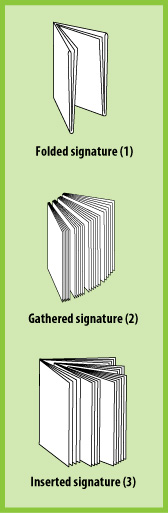
A finished book may appear as if it is made from a stack of loose pages. In many cases,multiple pages are often printed together on a much larger sheet, then folded, collated and trimmed on all sides. The trim eliminates the folds and leaves smooth edges. This is called creating signatures for binding.
A signature is a sheet of printed pages which, when folded, fall in order and become part of a book. Books may be made from more than one signature. Before a signature is created, prepress, in cooperation with bindery, must decide how to lay out the press sheet so the pages will appear in the proper sequence after the press sheets are folded and bound. This is called an imposition.
Flat sheet showing page imposition
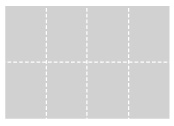 This flat sheet will result in a 16-page book[eight pages on the visible side and eight pages on the back]. Booklets and brochures of 8, 12, 16 or 32 pages may be made from a single folded press sheet depending on the size of the finished piece and the size of the paper. Imposition is the arrangement of pages on the sheet. Proper imposition guarantees that the pages will appear in the proper sequence and position after the sheet is folded and/or trimmed and bound.
When a press sheet is folded down, the inside pages will push out further from the spine than the outer pages. This is called creep or push out. The margins of these center pages must be adjusted so they compensate for creep, ensuring that the final pages have consistent margins. The heavier the stock, and the more pages in the signature,the more creep or push out will exist.
What is the maximum file size that can be uploaded?
ColorFX does not enforce a specific file size limit. We recommend to reduce your file size by “zipping” or “stuffing” them.